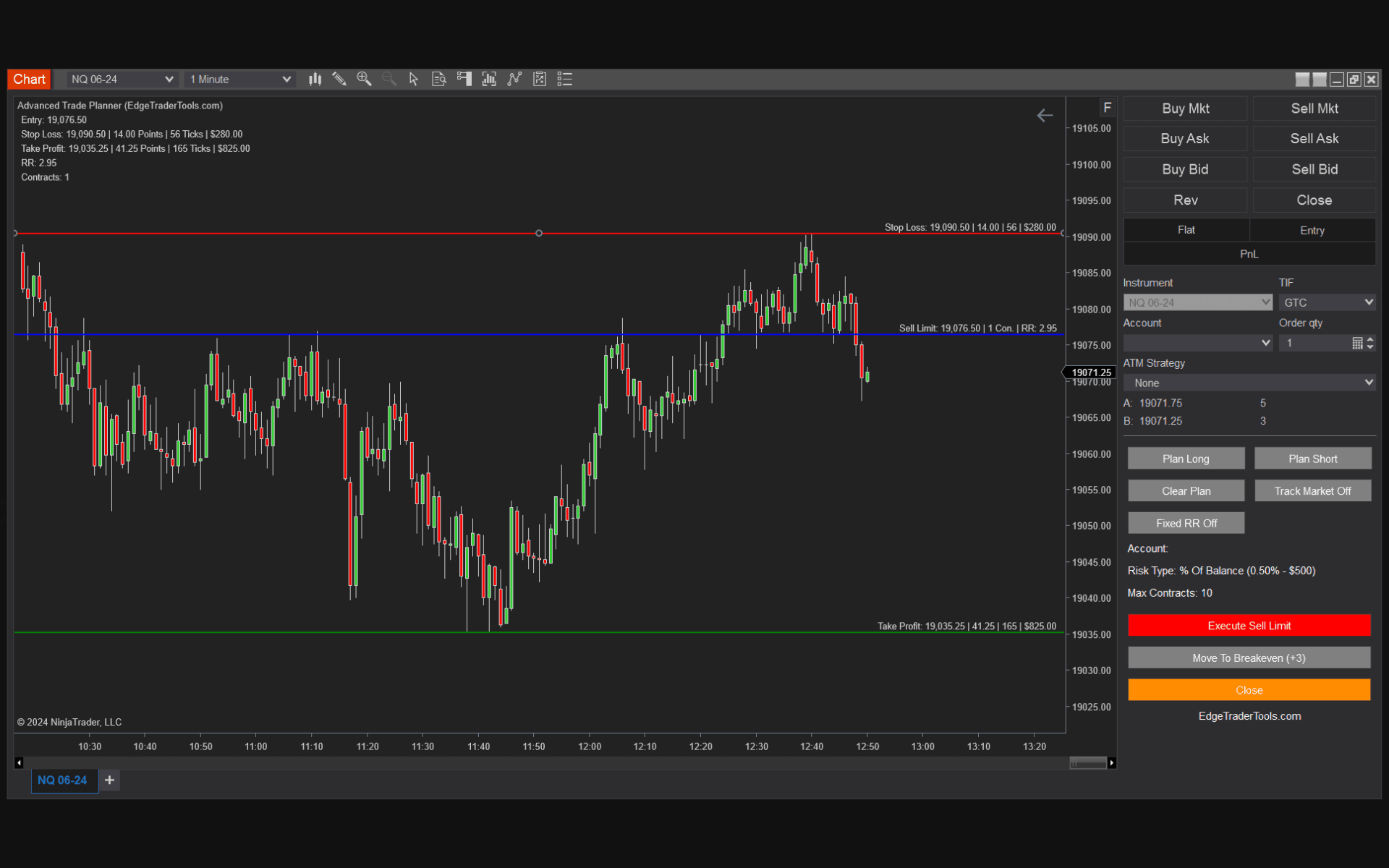
A NinjaTrader position size calculator answers the one question that decides whether your account survives: how many contracts can I trade on this setup without breaking my risk rules? Get it right and a string of losers is just a bad week. Get it wrong and a single oversized trade can undo a month. This guide covers the contract-sizing math, why doing it by hand fails under pressure, and how Edge Trader Tools turns it into an automatic, on-chart calculation inside NinjaTrader 8.
The position-sizing formula every futures trader needs
Position size in futures is driven by three inputs: how much you are willing to risk in dollars, how far away your stop is, and what each point is worth on the instrument you are trading. The formula is the same on every contract:
Contracts = Risk per Trade ÷ (Stop Distance in points × Point Value)
Example: a $25,000 account risking 1% ($250) on the Micro Nasdaq (MNQ), which is worth $2 per point, with a 30-point stop. That is 30 × $2 = $60 of risk per contract, so $250 ÷ $60 = 4 contracts. Switch to the full-size NQ at $20 per point and the same 30-point stop costs $600 per contract — more than your entire risk budget, so you size down to one contract, tighten the stop, or skip the trade. The math, not your conviction, sets the size.
Why calculating position size by hand fails
Most traders know the formula and still get it wrong in the moment. The problem is not arithmetic — it is timing and emotion. By the time price is at your entry, you are watching the tape, not opening a spreadsheet. Three failure modes show up again and again:
- Sizing by feel: adding contracts because the setup "looks great," instead of running the formula every single trade.
- Stale numbers: sizing off yesterday's stop distance or an old account balance because re-doing the math is friction.
- Fat fingers: typing the wrong quantity into the order entry box when seconds matter.
How Edge Trader Tools sizes positions automatically
Edge Trader Tools is a NinjaTrader 8 add-on that runs the position-sizing formula on the chart for you. You set your risk once — a fixed dollar amount or a percentage of your account — and drop your entry, stop, and target lines. The tool calculates the exact number of contracts from your stop distance and the instrument's point value, and the dollar risk, contract quantity, and risk-reward ratio update live as you drag the levels. A max-contract safeguard means you can never accidentally exceed your own limit.
Want to see the math before you install anything? Try the free on-site futures position size calculator, then let the add-on do it automatically on every live trade.
Bottom Line
Position sizing is the highest-leverage habit in trading and the easiest to skip when the pressure is on. A NinjaTrader position size calculator that runs on the chart removes the decision from the moment of execution — you set your risk, the tool sets your size. That is the difference between discipline that depends on willpower and discipline that is built into your workflow.
Frequently Asked Questions
Is there a position size calculator built into NinjaTrader?
NinjaTrader 8 does not include a dedicated risk-based position size calculator out of the box. Edge Trader Tools adds one that runs on the chart: you set a dollar or percentage risk per trade and it sizes every position automatically from your stop distance.
How does the calculator know how many contracts to trade?
It uses Contracts = Risk per Trade ÷ (Stop Distance × Point Value). You set the risk, you place the stop, and the tool reads the instrument's point value — the contract quantity updates live as you drag the stop.
Does it work on micro futures like MNQ and MES?
Yes. The calculation uses each instrument's point value, so it sizes correctly on micros (MNQ, MES, MGC, MCL) and their full-size counterparts alike.
How much does Edge Trader Tools cost?
A single-machine lifetime license is $149 and a dual license for two machines is $199. Both are one-time purchases with free lifetime updates and a 7-day money-back guarantee.
Trade With Automated Risk Management
Edge Trader Tools plugs directly into NinjaTrader 8 to size every position, enforce your stops, and keep you honest to your plan. Lifetime license, one payment.
See Pricing